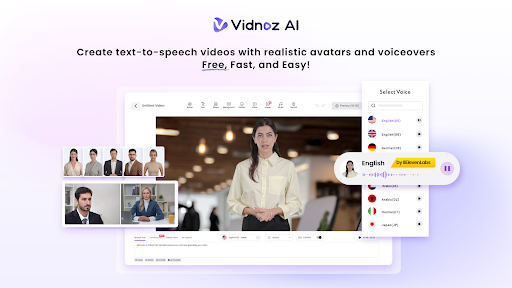
Adding videos to my website always felt like a big challenge. I had no video crew, no studio, and no large budget. I used some tools, and they were too costly and too complicated. I then found Vidnoz AI, and things improved.
Vidnoz AI video generator allows anyone to produce professional-looking videos without any technical skills or equipment. What built my trust right away was its security standard. The platform is ISO/IEC 27001:2022 certified in Information Security Management. This shows that Vidnoz AI takes user data protection very seriously. I had no doubts about using it from the first day. No concerns with privacy or data leaks at all. That trust made a big difference as I explored the platform further.
Why I Gave Vidnoz AI a Try
I needed something simple, reliable, and free to start. Vidnoz AI offered all three.I knew right from the start that the platform was full of features! I was able to use great tools even if I wasn’t paying for anything. Let’s go over the main points that made me return.
Key Features of Vidnoz AI
1900+ Lifelike Avatars
The avatar library was the first thing that caught my eye. Vidnoz AI offers over 1900 lifelike avatars from different industries and roles. You can find avatars for business, education, healthcare, retail, and many more fields.
What made it even better was the flexibility to customize. Here are three types of avatars I found most useful:
- Digital Twin: You can make an avatar that is a virtual representation of yourself with your photos or video.
- Expressive Avatar: These avatars convey genuine emotions and feel more human and engaging.
- Product Avatar: Ideal for showcasing a product in a simple and professional manner.
There is always an existing or customizable avatar to match the context. Whether the video is formal or casual, a fitting avatar is just a few clicks away. This made my content feel genuine and on-brand every single time.
2000+ Lip Sync AI Voices
The quality of the voice is crucial in any video. Vidnoz AI offers more than 2000 natural sounding AI voices in 140+ languages. This is powered by ElevenLabs, Microsoft and Google. This was much better than I’d anticipated. It is lip sync technology that fits all words on the lips of the avatar with an accuracy of up to 95%. My viewers could not tell the difference between a real speaker and an AI presenter. This was a great feature for me to reach audiences in multiple languages without needing to use a voice actor.
2800+ Pre-Designed Video Templates
I am not a designer by any means. So having over 2800 pre-designed video templates was a massive time saver. The templates cover a wide range of use cases including sales videos, content marketing and education. I picked a template that matched my website’s look and started editing right away. No design experience was needed. The results looked polished and completely professional every time.
Free Daily Use
Here is something I genuinely appreciate about Vidnoz AI. Every user gets 30 free credits every day. This was ideal for me as a beginner. I did not spend a single dollar when I first started. The free daily limit gave me enough room to test everything and create short videos for my website. It is a great way to explore the platform before upgrading to a paid plan.
How I Created My First AI Video
The whole process was simple and took very little time. Here is exactly how I did it in four easy steps:
Step 1: Choose a Template and Avatar
I opened Vidnoz AI and browsed through the template library. I chose a clean business-style template that matched my website’s design. Then I picked a friendly and professional-looking avatar from the library. I found one that matched my brand’s tone perfectly. This step took me about five minutes from start to finish.
Step 2: Create AI Voiceover
I typed my script into the text box on the editor. Vidnoz AI turned it into a voiceover within seconds. I selected an English voice powered by ElevenLabs. The voice sounded smooth, clear and very human. The avatar’s lips synced perfectly with every single word.
Step 3: Add Custom Touch
I added my logo, brand colors and a short call-to-action message. The drag-and-drop editor made this step quick and easy. I also updated the background to match my website’s overall theme and style.
Step 4: Generate AI Video and Share
I clicked generate and the video was ready in just a few minutes. I downloaded it and published it on my website right away. The final result looked like a professional production team had made it from scratch.
Final Thoughts
Vidnoz AI completely changed how I approach content creation. It is fast, easy and free to get started. The platform is packed with features that most paid tools charge a lot for. Whether you need videos for sales, marketing or general use, Vidnoz AI delivers strong results every time. I use it regularly now and I highly recommend giving it a try today.